
Quick Links
ToggleRunning a small retail store today means handling more than just walk-in customers. Orders can come from your website, WhatsApp, Instagram, or even a quick phone call. Payments happen in different ways, and deliveries often depend on separate tools.
In this blog, we are taking a look at how you can bring all of this together using a single order management system, so your daily operations feel less scattered and more under control.
Why Managing Everything Separately Is a Problem
Let’s take a simple situation.
A customer places an order on WhatsApp. You note it down somewhere. They pay using UPI. You check your bank app to confirm. Then you arrange delivery manually through a local partner. Somewhere in between, you forget to update the order status. The customer calls asking for an update. You scramble to check what happened.
This is not rare. It is how many small retailers operate every day.
When different parts of your business run on different tools or methods, small gaps start to show. And those gaps grow quickly as orders increase.
Here’s what usually goes wrong:
1. Orders Get Missed or Delayed
When orders are coming from different channels, it is easy to overlook one or process it late. There is no single place to track what is pending and what is done.
2. Inventory Mismatch
If stock is not updated in real time, you might end up selling items that are already out of stock. That leads to cancellations and unhappy customers.
3. Payment Confusion
You receive payments through UPI, cards, and cash. Without a system, it becomes hard to know which orders are paid and which are still pending. This can lead to awkward follow-ups or revenue loss.
4. Delivery Delays or Miscommunication
When delivery is handled separately, updates do not flow automatically. Customers keep asking for status updates, and you end up checking multiple places to respond.
5. No Clear Business Insights
When everything is scattered, it is difficult to understand what is working. You cannot easily track sales trends, popular products, or payment patterns.
Managing things this way may work when orders are low. But as soon as your store starts growing, it becomes difficult to keep up.
What Does “Managing Everything from One Place” Mean?
Managing everything from one place simply means using a single system that connects orders, deliveries, and payments into one workflow. Instead of switching between apps or tracking things manually, you get a complete view of your business in one dashboard.
Here is what that looks like in practice:
1. Orders
Every order, no matter where it comes from, appears in one place. You can see its status in real time, whether it is new, confirmed, packed, or delivered.
2. Delivery
You can assign delivery partners, track shipments, and send updates to customers automatically without making separate calls.
3. Payments
You can accept different payment methods like UPI, cards, and cash on delivery. At any point, you can clearly see which orders are paid and which are still pending.
When these three parts work together, your day-to-day operations become much smoother.
Here’s what to look for when choosing such a system.
Key Features Small Retailers Should Look For
Not every tool solves the full problem. A good system should feel like a central control panel for your store, not just another app to manage. From our experience at Zopping, here is what a complete setup should include.
1. Centralised Dashboard for Orders, Payments, and Deliveries
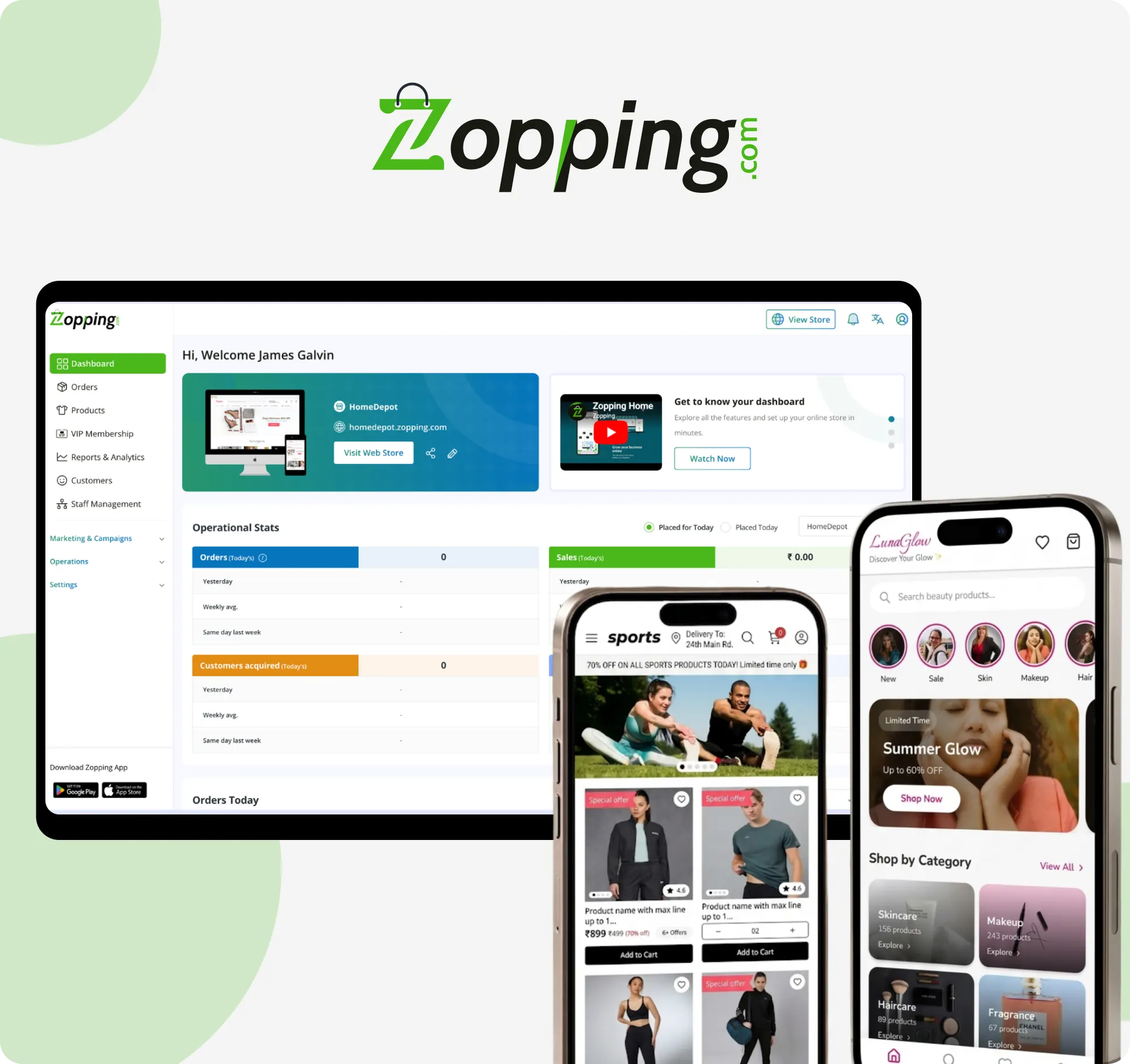
You should be able to see everything in one place. Orders, payment status, and delivery updates should all be visible without switching screens. This is exactly how we’ve structured the dashboard at Zopping, so you are not jumping between tools just to understand what is happening.
2. Multi-channel Order Capture
Orders should flow in from your website, WhatsApp, Instagram, and even offline sales. You should not have to manually enter orders from different sources. With Zopping, all of these channels connect into a single flow, so every order lands in one system without extra effort.
3. Automated Order Status Updates
As soon as an order moves from confirmed to shipped to delivered, the system should update it automatically. This keeps both you and your customer informed without extra effort. Zopping handles these updates in the background, so you do not have to track each step manually.
4. Integrated Payment Gateways
A good system should support UPI, cards, net banking, and cash on delivery. More importantly, it should automatically link payments to the correct orders. Zopping comes with built-in payment integrations that make this process seamless and accurate.
5. Delivery Partner Integrations
You should be able to connect with delivery services and track shipments in real time. This removes the need to manage deliveries separately. Zopping allows you to plug into delivery partners and monitor shipments without leaving the platform.
6. Inventory Sync
Every time an order is placed, your stock levels should update automatically. This helps avoid overselling and keeps your listings accurate. With Zopping, inventory updates happen in real time, so your stock always stays in sync across channels.
7. Simple Reports and Analytics
You should not need spreadsheets to understand your business. A good system gives you clear insights on sales, orders, and performance in a simple format, so you can make decisions without digging through data.
Step-by-Step: How to Manage Everything from One Place
If you are starting fresh or moving from a scattered setup, here is how you can bring everything together step by step.
Step 1: Set Up Your Online Store
Start by listing your products with proper names, prices, and images. This becomes the base of your entire setup, so take a little time to organise it properly. If you want a clearer walkthrough of how to get this right from the start, you can read more here.
Step 2: Connect Your Order Channels
Think about where your orders usually come from. Your website, WhatsApp messages, Instagram DMs, or even in-store purchases. The goal here is to connect all of these so every order shows up in one place instead of being scattered.
Step 3: Integrate Payment Options
Enable the payment methods your customers already use. This usually includes UPI, cards, net banking, and cash on delivery. Once this is done, payments should automatically get linked to the right orders, so you do not have to double-check each one.
Step 4: Set Up Your Delivery System
Decide how you want to handle deliveries. You can connect delivery partners, define the areas you want to serve, and make sure customers receive updates once their order is out for delivery. If you want to understand how this works in detail, you can explore this guide.
Step 5: Start Managing from Your Dashboard
Once everything is connected, your dashboard becomes your control centre. Orders come in, payments get updated, and deliveries move forward, all without switching between tools. This is where things start to feel much more manageable.
Benefits of Using a Single Order Management System
Here’s a closer look at the benefits of using a single order management system:
1. Saves Time
You spend less time switching between tools and more time focusing on sales.
2. Reduces Errors
Fewer manual entries mean fewer chances of mistakes.
3. Faster Deliveries
Orders move quickly from confirmation to dispatch without delays.
4. Better Customer Experience
Customers get timely updates and smoother service.
5. Easier Business Tracking
You can clearly see sales, orders, and payments in one place.
6. Helps Scale Business
As order volume grows, your system can handle it without adding complexity.
Closing Thoughts
Managing a retail store does not have to feel complicated. When orders, payments, and deliveries are handled in one place, your day becomes easier to manage and your business becomes easier to grow.
If you are still juggling between apps, spreadsheets, and manual tracking, it might be time to simplify the way you work.
At Zopping, we have built our platform to bring all of this together in a way that feels natural for small retailers. From capturing orders across channels to managing payments and deliveries in one dashboard, everything is designed to reduce effort and give you better control over your business.